简介
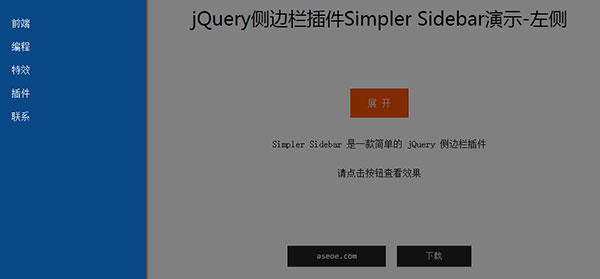
Simpler Sidebar 是一款基于 jQuery 的侧边栏插件,和 SidebarJS 类似。Simpler Sidebar 可以设置侧边栏的位置(左边或右边)、宽度,同时还可以设置是否显示遮罩以及遮罩的透明度。
浏览器兼容
 |
 |
 |
 |
 |
|---|---|---|---|---|
| IE7+ ✔ | Chrome ✔ | Firefox ✔ | Opera ✔ | Safari ✔ |
使用方法
1、引入文件
<script src="js/jquery.min.js"></script>
<script src="js/simpler-sidebar.min.js"></script>
2、HTML
<div class="sidebar" id="aseoe">
    <div class="sidebar-wrapper" id="sidebar-wrapper">
        <ul class="nav">
           <li><a href="http://www.aseoe.com/">前端</a></li>
<li><a href="http://www.aseoe.com/biancheng">编程</a></li><li><a href="http://www.aseoe.com/texiao">特效</a></li><li><a href="http://www.aseoe.com/plugin">插件</a></li><li><a href="http://www.aseoe.com/contactus">联系</a></li></ul> </div> </div>
3、CSS
.sidebar-wrapper {
    position: relative;
    height: 100%;
    overflow: auto;
}
4、JavaScript
$(function() {
    $('#aseoe').simplerSidebar({
        opener: '#toggle-sidebar',
        sidebar: {
            align: 'left',
            width: 250
        }
    });
});
配置
|
属性/方法 |
类型 |
默认值 |
说明 |
|---|---|---|---|
| opener | 字符串 | en | 按钮或图标的选择器,用来触发侧边栏 |
| attr | 字符串 | simplersidebar | 为侧边栏添加 data 属性,即默认添加 data-simplersidebar=”disabled” / data-simplersidebar=”active” |
| top | 整数 | 0 | 设置侧边栏 top 值 |
| animation | 对象 | 动画持续时间及动画方式,默认为: { duration: 500, easing: ‘swing’ } |
|
| sidebar | 对象 | 设置侧边栏的属性,如位置、宽度等,默认为: { width: 350, gap: 64, closingLinks: ‘a’, css: { zIndex: 3000 } } |
|
| mask | 对象 | 实现显示遮罩及设置遮罩属性:默认为: { display: true, css: { backgroundColor: ‘black’, opacity: 0.5, filter: ‘Alpha(opacity=50)’ } } |
本站欢迎任何形式的转载,但请务必注明出处,尊重他人劳动成果
转载请注明: 文章转载自:爱思资源网 http://www.aseoe.com/show-79-709-1.html
转载请注明: 文章转载自:爱思资源网 http://www.aseoe.com/show-79-709-1.html